One knowledge base. Every teammate's AI.
A shared knowledge base that ChatGPT and Claude can actually read. Built for small technical teams, founders, and indie SaaS: one place for the context your whole team keeps re-explaining.
Free to start, no credit card. Everyone brings their own ChatGPT or Claude.
The shift
Everyone's AI, reading the same notes.
What changes when your team's context lives in one place your AI can read.
| Before Hjarni | With Hjarni |
|---|---|
| Every teammate explains context to their own AI | Every teammate's AI reads the same team notes |
| Decisions disappear into Slack | Decisions live in a searchable decision log |
| New hires interrupt senior people for basics | New hires ask Claude or ChatGPT first |
| Runbooks are passive docs | Runbooks become instructions the AI can follow |
How it works
One shared brain. Every teammate's AI.
No new habits. Each person keeps the AI they already use.
Put your team's context in shared folders
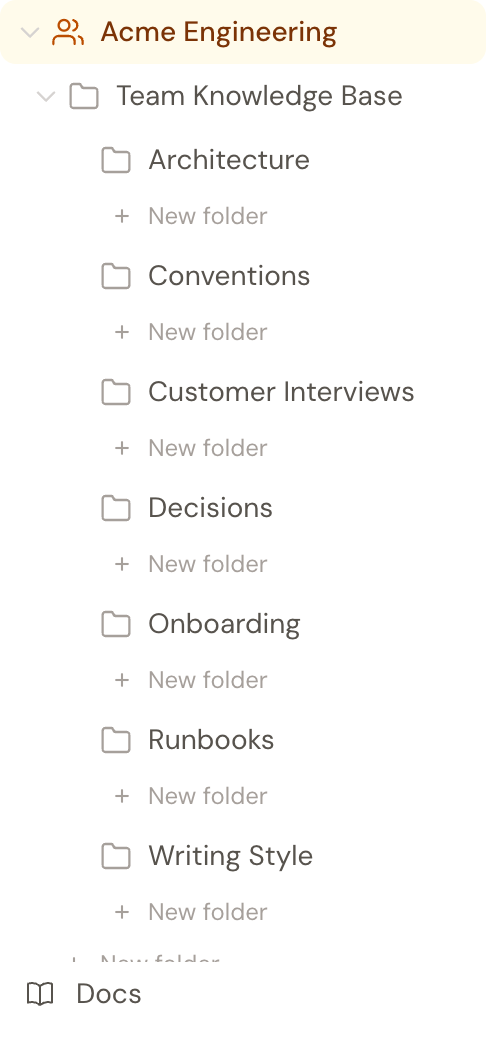
Runbooks, decisions, onboarding, customer interviews. Plain Markdown, one folder per kind of context, each with its own AI instructions.
Every AI reads and updates the same notes
Ask your assistant to search the team's folders before answering and save decisions back. The next teammate's AI can retrieve the updated notes.
See it work
A new hire asks. The team's notes answer.
No senior engineer interrupted. Claude reads the team's Runbooks and Decisions folders and answers from what's written down.
Claude answers a new hire's deploy question from the team's shared runbook.
What teams keep in Hjarni
The context you keep re-explaining.
Write it down once. Ask each teammate's AI to check the shared notes.
Runbooks the AI can read
Deploy steps, rollback procedures, and incident playbooks. Add a folder instruction and your team's AI becomes the first responder, not a wiki nobody opens at 3am.
Decision logs as institutional memory
Why you picked Postgres, why pricing went flat, what you tried and rejected. When anyone asks "why do we do X this way", the answer comes from the log, not guesswork.
Shared customer interview memory
Thirty interviews in, ask "what did our last ten customers say about onboarding" and get real answers with real quotes, from every teammate's AI.
Onboarding for new hires
The unwritten context lives in three Slack channels and one person's head. Write it once and a new hire's AI reads it on day one.
What makes it different
Simple on purpose, even for teams.
AI-native, not AI-added
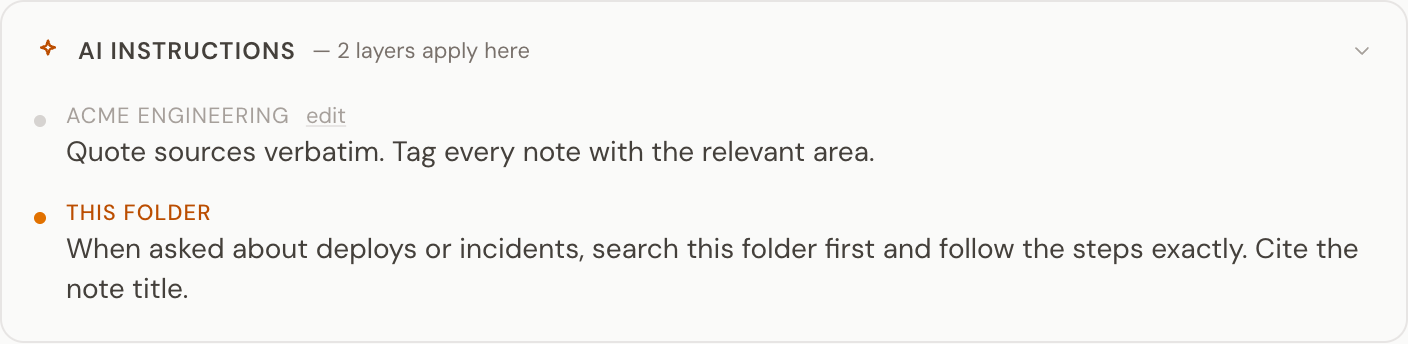
The MCP server is built in, not bolted on. Every folder can have its own AI instructions. Claude and ChatGPT follow them.
Personal and shared together
Personal notes stay personal. The team knowledge base is shared. One login, both spaces.
Roles, not all-or-nothing
Give each teammate a viewer, editor, or admin role, from a team-wide default down to individual folders. Sensitive folders stay read-only for most of the team while shared ones stay editable.
No bundled AI
Team members bring their own ChatGPT or Claude. No per-message costs. No token limits per seat. No surprises on the bill.
Roles & permissions
Who can edit what
Everyone on the team can read the shared knowledge base, so every teammate's AI works from the same notes. Roles just decide who can change what.
Each member has a role on every folder: a viewer reads, an editor reads and writes, an admin also manages other members' roles. Set a team-wide default, then override it per folder where you need to. The owner always keeps full control of every folder.
Need SAML SSO, SCIM provisioning, or a per-team audit log? See Hjarni for Teams (Enterprise).
From the people who use it
My notes, generated by AI, shared with my team, so our AI agents always have the full context of everything.
We run Hjarni on Hjarni. Our roadmap, launch checklists, and customer notes live in one shared knowledge base, and Claude reads and updates it every session instead of me re-explaining where things stand.
Pricing
Per seat. No AI on the bill.
Teams is $20 per seat per month for the shared knowledge base. Seats prorate automatically as people join or leave. Everyone brings the ChatGPT or Claude subscription they already have.
Start free for your first 25 team notes. No card needed.
Common questions
Common questions
Can my team share memory across ChatGPT and Claude at the same time?
Yes. The shared notes live in Hjarni, not inside any one AI product, so a teammate on ChatGPT and a teammate on Claude read and write the same knowledge base. That is the difference from ChatGPT memory or Claude Projects, where the context is locked to one product and usually to one person.
What does a team actually get on the Team plan?
A shared knowledge base separate from everyone's personal notes: shared folders, team-level AI instructions that every member's AI follows, per-folder viewer, editor, and admin roles, and member management. Each teammate connects the AI they already use to it. SAML single sign-on, SCIM provisioning, and a per-team audit log are available on request for companies that run a security review.
Can the same note be both personal and shared?
Each note lives in either your personal space or a team, and you can move it across whenever you need to.
Do all teammates need their own AI subscription?
Everyone uses the AI they already have, like ChatGPT, Claude, or Cursor. Hjarni gives that AI a shared memory rather than bundling one, so each teammate keeps their own subscription.
How does pricing work for teams?
Teams is $20 per seat per month, free for your first 25 team notes. Seats prorate automatically as people join or leave, and the plan covers shared folders, team-level AI instructions, and member management.
Can different teammates set different AI instructions?
Team-level instructions are shared across the team. Personal instructions stay personal.
Can I control who can edit which folders?
Each member has a viewer, editor, or admin role on every folder, resolved from a team-wide default and any per-folder overrides. A viewer reads, an editor also writes, an admin also manages other members' roles. Everyone on the team can read the shared folders; roles decide who can change them. Roles cascade to subfolders, and the team owner always keeps full control.
Which templates fit a team setup?
Developer Project Memory and Customer Interview Repository are the two strongest team starters. Meeting Memory and Writing Style Guide pair well once the team is past the first install. Templates build their folder tree in your personal space; move the folders into the team when you bring the team in.
Start your team
One brain. Every teammate's AI.
Start free with 25 team notes. No credit card required.
Per seat when you grow. Everyone brings their own ChatGPT or Claude.