Teams and sharing
Teams let you share a knowledge base with colleagues. Everyone on the team can read, create, and organize notes in shared containers. AI assistants follow team-level instructions.
What teams are
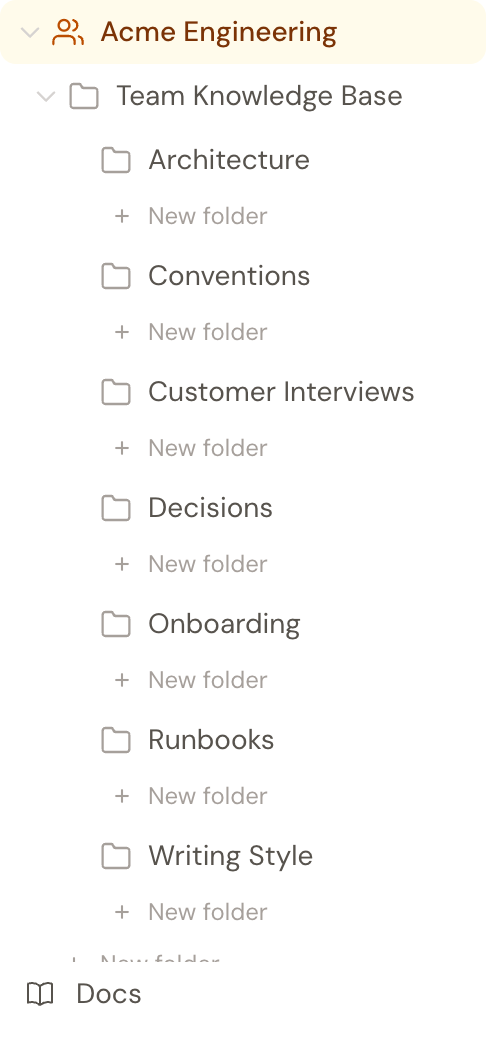
A team is a shared knowledge base that multiple people can access. Each team has its own containers, notes, and tags. Separate from your personal knowledge base.
Each member connects their own AI (ChatGPT or Claude). The team's AI instructions apply to everyone.
Teams are the full shared-space model. Hjarni also supports sharing personal containers with collaborators, but that is a narrower permission model than a dedicated team workspace.
One shared brain. Every teammate's AI.
A shared knowledge base every teammate's ChatGPT or Claude can read. Per seat — everyone brings their own AI.
How teams work
Shared containers
Teams have their own container hierarchy. All team members can create, read, and organize notes in these containers.
Team AI instructions
Set AI instructions at the team level. Every member's AI assistant follows the same conventions when working with team notes.
Member management
Invite members by email. The team owner manages membership and invitations.
Separate from personal
Team notes and personal notes are separate. Your personal knowledge base stays private.
Folder permissions
By default, every team member can read, write, and organize anything in the shared workspace. If you need to tighten that, say a finance folder only finance sees, or a runbooks folder a contractor can read but not edit, set per-member roles at the team level or per folder.
Three roles, in order: viewer (read-only), editor (read & write), admin (read & write & manage permissions on this folder's subtree). The team owner is always admin everywhere.
Setting roles
There are two places to set roles. Only the team owner sets team-wide defaults; per-folder overrides can be set by the owner or by anyone with admin on that folder.
Members tab: team-wide default
On the team's Members page, each member has an Inherit/Viewer/Editor/Admin dropdown. This sets their role across the entire team. Use "Inherit" to keep the team default (editor for members, admin for the owner).
Folder edit page: per-folder override
Open a team folder's edit page, switch to the Permissions tab, and set a member's role just for that folder. The role cascades to all sub-folders unless they have their own override.
Folder overrides tab
The Members page has a "Folder overrides" tab listing every per-folder role you've set, with a Clear button on each one. Useful for auditing or undoing a delegation in one place.
How roles cascade
Roles resolve from the most specific match upward:
- An explicit role on this folder.
- An explicit role on the nearest ancestor folder.
- The team-wide role set on the Members tab.
- The team default (editor for members, admin for the owner).
Example: you set Alex to viewer team-wide. Alex can read everything but write nothing. You then set Alex to admin on the "Engineering Runbooks" folder. Alex now has admin on Runbooks (and its sub-folders), and viewer elsewhere.
What each role can do
If you're a team member trying to figure out what your role lets you do, this is the reference.
| Action | Viewer | Editor | Admin | Owner |
|---|---|---|---|---|
| Read folder & notes | ✓ | ✓ | ✓ | ✓ |
| Create, edit, delete notes inside | — | ✓ | ✓ | ✓ |
| Rename folder, change description / AI instructions | — | ✓ | ✓ | ✓ |
| Create child folders, move folder (with editor on destination) | — | ✓ | ✓ | ✓ |
| Delete the folder | — | ✓ | ✓ | ✓ |
| Manage roles on this folder & sub-folders | — | — | ✓ | ✓ |
| Manage team membership & invitations | — | — | — | ✓ |
| Set team-wide default roles, transfer ownership | — | — | — | ✓ |
| Toggle public sharing on a folder | — | — | — | ✓ |
| View the team audit log | — | — | — | ✓ |
The same rules apply when an AI assistant acts on your behalf via MCP or the API. Your role gates what the tool can do.
Editing the same note at once
If two people save the same note around the same time, the second save no longer silently overwrites the first. The same protection applies when you edit a note in the browser while Claude or ChatGPT is editing it via MCP.
The second save lands on a conflict screen showing who saved, when, and exactly what they changed. From there you have three ways to resolve it:
- Use the saved version. One click to discard your draft and accept what's already there.
- Pick line-by-line. Every change gets three options: keep yours, keep theirs, or write your own merge.
- Merge by hand. The editor still has your draft. Edit it and save normally.
Your draft is preserved while you decide. Nothing is saved until you choose. See the changelog entry for the full story.
Common use cases
Startup knowledge base
Shared company knowledge that any team member's AI can search. Decisions, processes, and context in one place.
Shared research repository
A team of researchers capturing findings that everyone's AI can reference and build upon.
Content team workflow
Writers and editors sharing source material, briefs, and style guides that AI follows consistently.
Operating manual for a small team
Document processes, runbooks, and decisions. New members ask their AI and get answers from day one.
Common questions
FAQ
What is shared?
Everything in the team's knowledge base: notes, containers, tags, and AI instructions. Your personal knowledge base remains private.
Can teams use MCP too?
Yes. Each team member connects their own AI assistant via MCP. The AI can access both personal and team knowledge bases.
How is this different from sharing one container?
A team has its own separate notes, containers, tags, billing, and team instructions. Shared personal containers keep ownership anchored to one person's personal brain and expose a narrower surface area.
Who can manage members?
The team owner invites and removes members. The person who creates the team is its owner. Folder roles control who can view or edit content; membership itself stays with the owner.
What plan is required?
None to start. Every team is free for its first 25 team notes, then moves to per-seat billing. Each member needs their own Hjarni account, free or paid.
Related docs
Questions about teams?
Email evert@hjarni.com
Give your AI a memory. Free.
Connect Claude or ChatGPT to notes they can actually read and write.
Give your AI a memory. Free.