The problem
Research generates knowledge that lives in your head. Paper summaries. Half-formed hypotheses. Connections between sources. When you ask an AI to help you think through a problem, it doesn't know any of that. You re-explain your entire research context before you can get useful help.
How researchers use Hjarni
Keep your literature notes, research questions, and synthesis documents in Hjarni. Organize by project or theme. Connect Hjarni to ChatGPT or Claude and your AI has access to everything you've written. It finds patterns. Spots gaps. Drafts arguments that build on your actual reading.
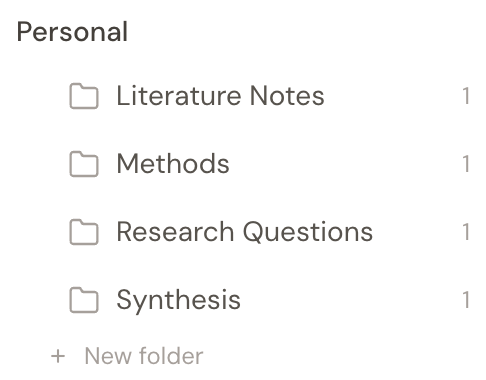
A typical researcher setup
- Literature notes folder: one note per paper with key findings and your commentary
- Research questions folder: open questions, hypotheses, things to investigate
- Synthesis folder: draft arguments, thematic summaries, literature reviews
- Methods folder: data collection protocols, analysis approaches, tool notes
- AI instructions: "Always cite which of my notes you're drawing from"
A concrete workflow
You've read 30 papers on knowledge transfer in distributed teams. Each one has a note in Hjarni with your summary and key takeaways. You ask Claude: "What are the main tensions in the literature on knowledge transfer barriers?" Claude reads your notes and synthesizes across them. It cites your annotated papers. Not generic training data.
New paper? Add a note. Next conversation already includes it.
Prompts like "Compare these three methods papers" or "Draft a literature review from my annotations" work better when your assistant can pull from the notes you have already made.
Start with the Knowledge Wiki template
The Knowledge Wiki template gives you a research wiki with sources, topics, open questions, and a changelog, plus AI instructions that handle the bookkeeping. Paste the template link into Claude or ChatGPT and it creates the initial structure for you.
Why not just use Zotero or a reference manager?
Reference managers handle citations and PDFs. But your thinking lives somewhere less structured: the annotations, the connections, the questions. Hjarni gives that thinking a home your AI can actually read.
An AI that knows what you've read can help you think. One that doesn't is just a search engine.
What researchers organize in Hjarni
- Literature notes: one searchable place for summaries, quotes, and your own commentary
- Open questions: hypotheses, unresolved tensions, and ideas worth testing next
- Methods context: protocols, analysis choices, and tool notes your assistant can reference
- Synthesis drafts: living literature reviews and thematic notes that accumulate over time
- Research instructions: rules such as citation expectations or evidence standards by project
- Shared project memory: a common knowledge base for labs, collaborators, and future you