Team audit log (Enterprise)
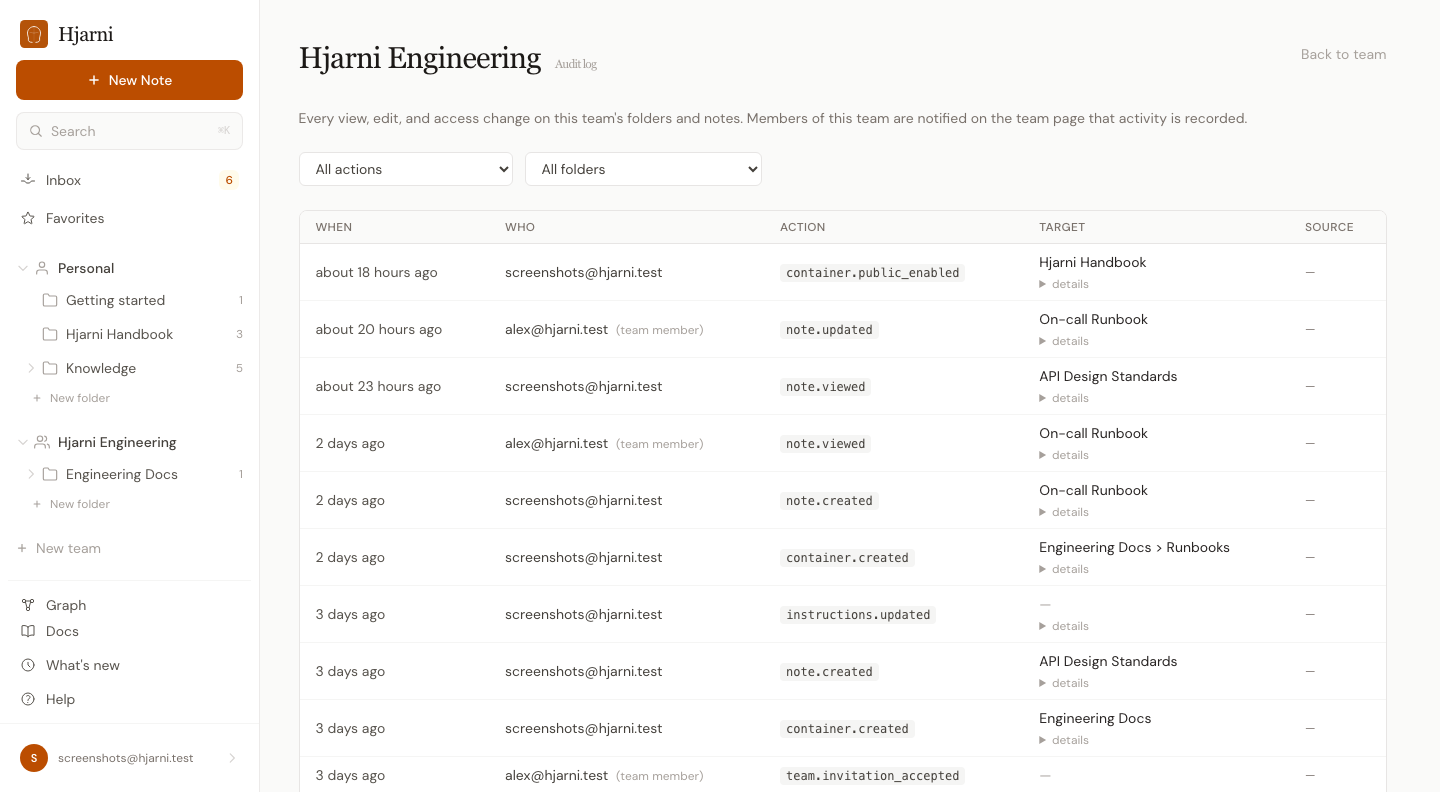
Enterprise teams can now turn on an audit log that records every view, edit, and access change on the team's folders and notes. Built for client-adjacent or partner-only folders where "who saw what" actually matters. Available alongside SAML SSO and SCIM provisioning.
When the flag is on for a team:
- Every page view of a team note or folder writes a row. Web, REST API, MCP, anonymous public links. All hooked.
- Every mutation writes a row: creates, edits, archives, deletes, moves, favorites, exports.
- Every access change writes a row: invites, accepted invitations, member removals, ownership transfers, public links toggled, SCIM provisioning.
- Bulk operations (the new multi-select on the notes page) write one row per affected note.
Each row captures the actor, the source surface, the MCP client when applicable, and a hashed IP. Enough to verify access without storing the raw address. The audit log is a team-only feature; personal accounts stay out of it by design.
Where to find it: team page → "View audit log" link in the disclosure banner, once the flag is on. Members see the banner so they know their activity is recorded.
How to enable it: email evert@hjarni.com and mention the team name. Available to enterprise teams alongside SAML SSO and SCIM.
Limitations worth knowing: no automatic retention pruning yet, no built-in CSV export, and MCP search results don't write a per-hit view row. A single search can surface 100 notes, which would dwarf real reads. See the docs page for the full list.