Skip to content

Context for the way you work

Hjarni for Personal Life

Your AI gives the same answers to everyone. Teach it your life once, and stop re-explaining yourself.

25 notes free, forever. No credit card required.

We’ll keep the template ready while you connect your assistant.

Hjarni has its own native apps. Free on every plan for iPhone, iPad and Apple Silicon Mac and Android. Same account, same notes as the web. An internet connection is required.

Claude

Personal Life

You: What colour is the living room painted?

Hjarni · Search

Claude: From your house note: warm grey, matt, two coats. The leftover tin is in the garage.

You: We repainted last month. It's off-white now.

Hjarni · Update Note

Claude: Updated your house note: the living room is off-white. Saved for the next conversation to look up.

Recreated example. Responses depend on your saved notes.

Ask about your own life and get a real answer

Birthdays, favorite places, house details, and routines become reusable context your assistant can look up when it replies, and update when they change.

Claude answers from your house note, then updates it when the details change.

The problem

Gift ideas, dinner suggestions, and weekly plans work better with your own context: that you're vegetarian, which Bosch washing machine you own, or which plumber you trust. ChatGPT and Claude can remember details from past conversations, with controls to review and correct what they retain. If you want the same maintained household notes available to both assistants, a shared knowledge base gives you a place to keep them.

How people use Hjarni for personal life

Keep small, durable notes about the people, preferences, and practical details that make up your life. Connect ChatGPT or Claude once, and your AI can search and read the relevant notes when a question calls for them, or when you ask. An AI instruction can encourage it to check Hjarni first. Ask it to retrieve the relevant note when you need to be sure it uses that context.

A typical personal setup

  • People folder: birthdays, gift ideas, kids' names, what you last talked about
  • Household folder: appliance models, paint colors, wifi details, tradespeople you trust
  • Preferences note: food rules, sizes, routines, how you like plans made
  • Plans folder: trips, weekends, and the running list of things to book
  • AI instructions: "We're vegetarian. Weeknight dinners under 30 minutes. Never plan anything on Sunday mornings."
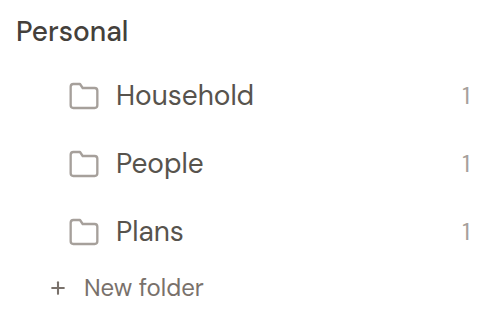
The folder sidebar in Hjarni showing People, Household, and Plans folders, each with one note.

A concrete workflow

Sunday evening, you ask Claude: "Read our preferences and last week's meals in Hjarni, then plan our dinners for the week." Your notes say you're vegetarian and weeknights need to stay under 30 minutes. Claude can use those details to draft a plan and grocery list for you to check.

The habit that makes it work is small: after a dinner with a friend, add one line to their note. Next gift, next visit, next "what was that place they recommended?" gets easier.

Why not just use ChatGPT's memory?

ChatGPT and Claude provide controls to review, correct, and remove remembered information. Hjarni adds explicit Markdown notes you write, read, and edit, with the same notes available for connected assistants to retrieve through MCP. See Hjarni vs ChatGPT Memory for the full comparison.

Keep the details worth remembering in notes you can check and update.

What people save in Hjarni

  • People: birthdays, gift ideas, and the details worth remembering between visits
  • Household: appliance models, paint colors, meter numbers, and trusted tradespeople
  • Preferences: food rules, sizes, routines, and brands that fit
  • Recipes and meals: what you cook, what worked, and what to make again
  • Plans: trips, weekends, gift lists, and things to book
  • Routines: workouts, allergies, and habits you want your AI to respect

Starter template

Skip the blank page

Choose a template, connect your assistant, and ask it to create the folders and instructions. Then save a real note and ask for it in a new chat.

Common questions

Questions people actually ask

Can ChatGPT remember personal things about me?

Yes. Save what matters as notes in Hjarni, such as people, preferences, household details, and plans, then connect ChatGPT or Claude over MCP. Your AI can search and read relevant notes when a question calls for them or when you ask. The notes persist across conversations, while retrieval depends on the assistant using the connection.

What should I put in a personal knowledge base?

Start with whatever you keep re-explaining: dietary rules, birthdays and gift ideas, appliance models, trusted tradespeople, travel preferences, and routines. Small factual notes are a useful starting point. Ask your assistant to retrieve the relevant notes and check what it used.

How is this different from ChatGPT's built-in memory?

Native memory can be reviewed and corrected through the controls available on the account. Hjarni adds deliberately maintained Markdown documents, sharing and attributed note versions across compatible connected assistants. Use the workflow that fits the information you want to maintain.

Is my personal information private?

Personal notes are separate from shared team notes. A connected assistant can access notes through permitted tools; normal OAuth connections retain your account’s full access. You can revoke the connection. Export active notes and attachments as Markdown; standard export omits revision history and folder instructions. See privacy and permissions and export details.

Do I need to be technical to set this up?

No. You write notes in plain language and connect ChatGPT or Claude with a short guided setup. No code and no plugins: if you can use a notes app, you can use Hjarni.

Start with Personal CRM

Start here

Write once. You both remember.

25 notes free, forever. No credit card required.

5 out of 5 from 14 reviews 11,600+ notes a day read or updated by AI

Works with Claude, ChatGPT, Cursor and any MCP client.