Conflict-safe note editing
Until now, if two editors saved the same note at once, the second save quietly overwrote the first. That includes you editing on the web while Claude or ChatGPT was updating the same note via MCP. Not anymore.
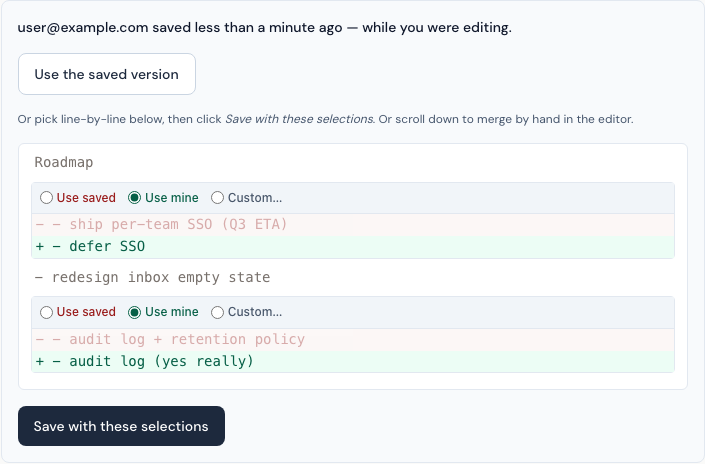
When a conflict happens, the second save lands on a screen that tells you who saved while you were editing, when, and what they changed. From there you have three ways out.
- Use the saved version. One click to discard your draft and accept what's already there. The shortcut for "never mind, theirs is fine."
- Pick line-by-line. Every change shows up with a paired radio: keep your version (green), keep theirs (red), or write your own merge (Custom…). The discarded side dims so you can see what you're choosing at a glance. Click Save with these selections when you're done.
- Merge by hand. The editor below the diff still has your draft. Edit it and hit Update Note to save.
Your draft is always preserved while you decide. Nothing is saved until you choose.
For agents and integrations: the MCP notes-update tool and the REST API both accept an optional expected_lock_version parameter. Pass the lock_version you saw when you last read the note. If it doesn't match the current version, the server rejects your write with a structured conflict response. (One exception, on MCP only: a call whose sole edit is append_body goes through even with a stale version, because a bare append lands at the end of the current body and can't lose anyone's work.) Surgical body edits (replace_find, insert_after, append_body) remain anchor-safe with or without the version. Tool descriptions and API responses include lock_version on every read so you always have it to echo back.
This is mostly a safety net. Most edits don't collide, but when they do, you stop losing work.