Give each agent only the folders it needs
Until now a token for Hjarni was all or nothing. Hand one to Claude Code for a coding project and it could also read your journal, your contracts and every team you belong to. The old way to narrow it, a token tied to one folder, only worked for the REST API and only for that one folder.
Now every agent can have its own token, and you decide what it reaches, folder by folder.
Choose per folder. In Settings › Connections, make a token and leave Access on Only what I choose. Its page lists your spaces and folders, and for each one you pick No access, Read or Write. A level passes down to every folder inside until a folder sets its own, so Write on Projects and No access on Projects › Contracts does what it says. Each space has a row too, which also covers your Inbox or the team's unfiled notes.
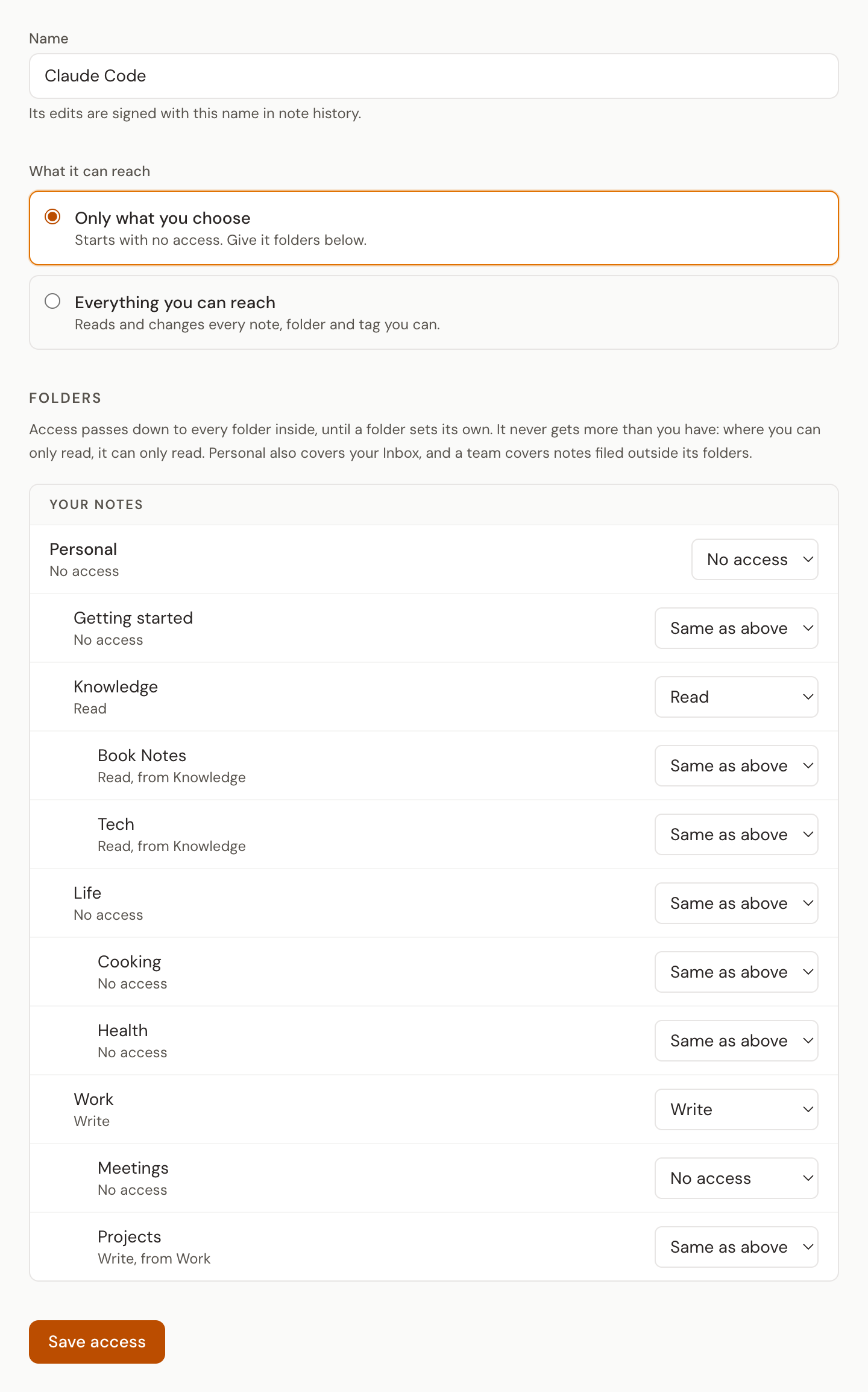
It starts with nothing. A new agent token reaches no folders until you give it some. Forget to set it up and the agent finds nothing, rather than everything.
Or set it from the folder. A folder's Permissions tab now lists your agent tokens, so handing one folder to three agents is one screen.
Never more than you. An agent's level is capped by yours. Where you are a viewer in a team, it can only read. Leave the team and its access there goes with you.
Its own name in history. When an agent changes a note's text, title or folder, note history signs it with its token's name, so "Written by research bot" sits next to your own edits, and you can restore an earlier version of the text like any other.
What it does not see stays hidden. Search, lists, tags and counts leave out folders it was not given, and nothing names them. Tools that act on the whole account, such as renaming tags or inviting people, are not offered to it, and it cannot change your brain instructions.
One token works for MCP and the REST API alike. Assistants you connect by signing in, such as ChatGPT and Claude.ai, keep your full access as before.
Your existing tokens keep working. A full-access token stays full access until you limit it on its page. A token that was tied to one folder is now an agent token with Write on that folder: the same folder as before, and now over MCP too.
It is on every plan. Open Settings › Connections, read the details in Agent tokens, or see what it means for AI agents.