A knowledge base for AI agents
Your agents share one brain.
Each gets only the folders you choose.
Claude Code, Codex, OpenClaw, a research bot, a script. Give each one its own token, decide folder by folder what it can read or write, and see its edits in note history, signed with its name.
Free to start. Agent tokens are on every plan.
The problem
Agents need memory. They don't need everything.
An agent without memory starts every run from zero. It reads the same files, asks the same questions, and repeats the investigation it finished yesterday.
The usual fix is to hand it a key to your notes. Now the coding agent can read your journal. The research bot can rewrite your contracts. And when something changes, you can't tell which agent did it.
Hjarni gives every agent the same knowledge base, and each one only the part it needs.
How it works
One token per agent. One level per folder.
Set it once in Settings. It holds over MCP and the REST API alike.
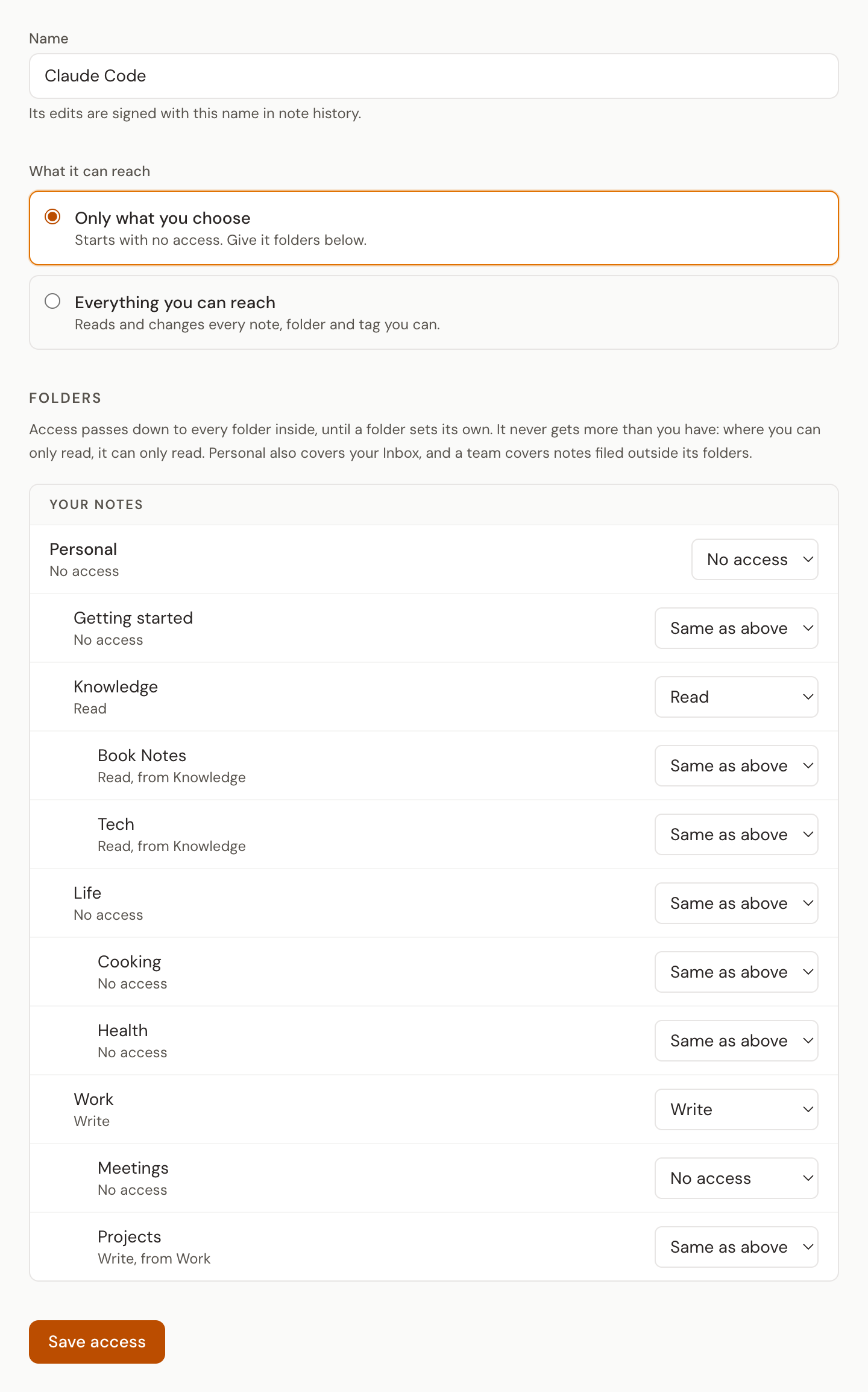
A token for each agent
Name it after the agent that uses it. A new token reaches nothing until you give it folders, so a forgotten setup finds nothing rather than everything.
Read or write, per folder
No access, Read or Write on any folder or whole space. It passes down the tree until a folder sets its own. An agent never gets more than you have.
Edits signed with its name
Its changes to a note's text, title or folder carry the token's name in note history. See what the research bot changed, and restore an earlier version of the text.
What agents do with it
Read what came before. Write down what lasts.
The loop every useful agent runs, with a boundary around each one.
A coding agent
Claude Code or Codex reads the project's decisions and conventions before it starts, and writes new decisions back. Write on Projects, nothing else.
A research bot
Reads your reading notes and sources, files findings into a Research folder. Read on one, Write on the other.
A capture script
A hook or a Zapier zap that saves sessions and emails as notes. Write on the one folder it files into, and nothing else.
A team agent
Answers from the team's runbooks and customer notes, read only. It never sees anyone's personal notes.
An always-on agent
Keeps project state between runs: what it tried, what worked, what is still open. The next run starts where the last one stopped.
A reviewer
Reads a folder to check work against your standards, and can't change any of it.
Why not just
Memory you can read. Access you can see.
Most agent memory is either private to one tool or wide open.
Built-in agent memory
Locked inside one tool. Your other agents can't read it, and you can't easily check or correct what it holds.
A full-access API key
Every agent reaches every note, and every change looks the same. One bad run can touch everything.
Hjarni agent tokens
Plain Markdown every agent can share, a boundary around each one, and a signed history of what each one wrote.
Connect an agent
One command. Or one header.
Make the token in Settings, give it its folders, then point the agent at Hjarni.
Claude Code, over MCP
claude mcp add --transport http hjarni https://hjarni.com/mcp \
  --header "Authorization: Bearer YOUR_AGENT_TOKEN"
A script, over the REST API
curl https://hjarni.com/api/v1/notes \
  -H "Authorization: Bearer YOUR_AGENT_TOKEN"
Cursor, OpenClaw and other MCP clients take the same token in their config, and Meta Muse takes it as a custom connector over the REST API. ChatGPT and Claude.ai connect by signing in and keep your full access. The agent token docs cover every client and level.
Common questions
Common questions
What is an agent token?
A token you make for one agent, script or integration that reaches only the folders you give it. Per folder or space you choose No access, Read or Write, and that passes down to the folders inside until one sets its own. The full setup is in Agent tokens.
Which agents can use one?
Any client that sends a Bearer token: Claude Code, Codex, Cursor, OpenClaw, custom MCP agents, and anything calling the REST API. ChatGPT, Claude.ai and Claude Desktop connect by signing in instead, and keep your full access.
Can an agent get more access than I have?
No. Its level is capped by yours. In a team folder where you are a viewer it can only read, and in a folder someone shared with you it can only read too. Leave a team and its access there is removed.
What can't an agent token do?
Anything that acts on the whole account: renaming, merging or deleting tags, inviting people, changing who can see a folder, making email capture addresses, or changing your brain instructions. Folders it was not given are never named to it, and notes in them read as not found.
How do I see what an agent changed?
Its changes to a note's text, title or folder are signed with the token's name in note history. Open a version to see how it differs from the note now, and restore an earlier version of the text the same way you would undo your own edit.
Is it a paid feature?
No. Agent tokens, the MCP server and the REST API are on every plan, Free included.
Give every agent a memory. Keep the keys.
Start with one agent and one folder. Add the next when you need it.
Free to start. No credit card required.