Note history and Trash
Every content edit to a note is saved as a version, attributed to whoever made it, so you can see who wrote what, read any earlier version, and roll a note back in one click. Deleting a note is recoverable too: it goes to Trash and stays restorable for 30 days. This works the same whether the edit came from you, from Claude or ChatGPT over MCP, or from the REST API.
How versioning works
Every content edit is recorded as an immutable version. That means changes to the body and to structural fields (title, folder, source URL, favorite, archive state). A summary-only change, like the background job that regenerates a note's summary, does not create a version. One deliberate exception: archiving a whole folder flips its notes in bulk and records a single folder-level audit entry instead of a version per note, so retiring a large import does not flood each note's history.
History is append-only. Once its coalescing window closes, a version is never rewritten or removed, so the record stays trustworthy: what you see is exactly what happened, in order.
Rapid successive edits by the same author fold into a single version. When an assistant ticks eight checkboxes in one burst, that reads as one entry, not eight, so a chatty agent never buries the history.
Who edited what
Every version records its author and the surface the edit came through. Authors fall into three kinds:
- You. A signed-in person, shown by email address.
- An AI assistant. An agent connected over MCP, such as Claude or ChatGPT, with the specific client shown where it can be identified.
- The system. Automatic housekeeping, like refreshing a wiki-link's title when the note it points to is renamed.
Each note shows who last wrote it, with a badge that tells a human editor apart from an AI assistant at a glance. That is the heart of write-back trust: you can always see whether a paragraph was you or your assistant.
Viewing a note's history
Open a note's history to see every version, newest first, each with a plain-language summary of what changed and who changed it. Click any version to read the note exactly as it stood at that point.
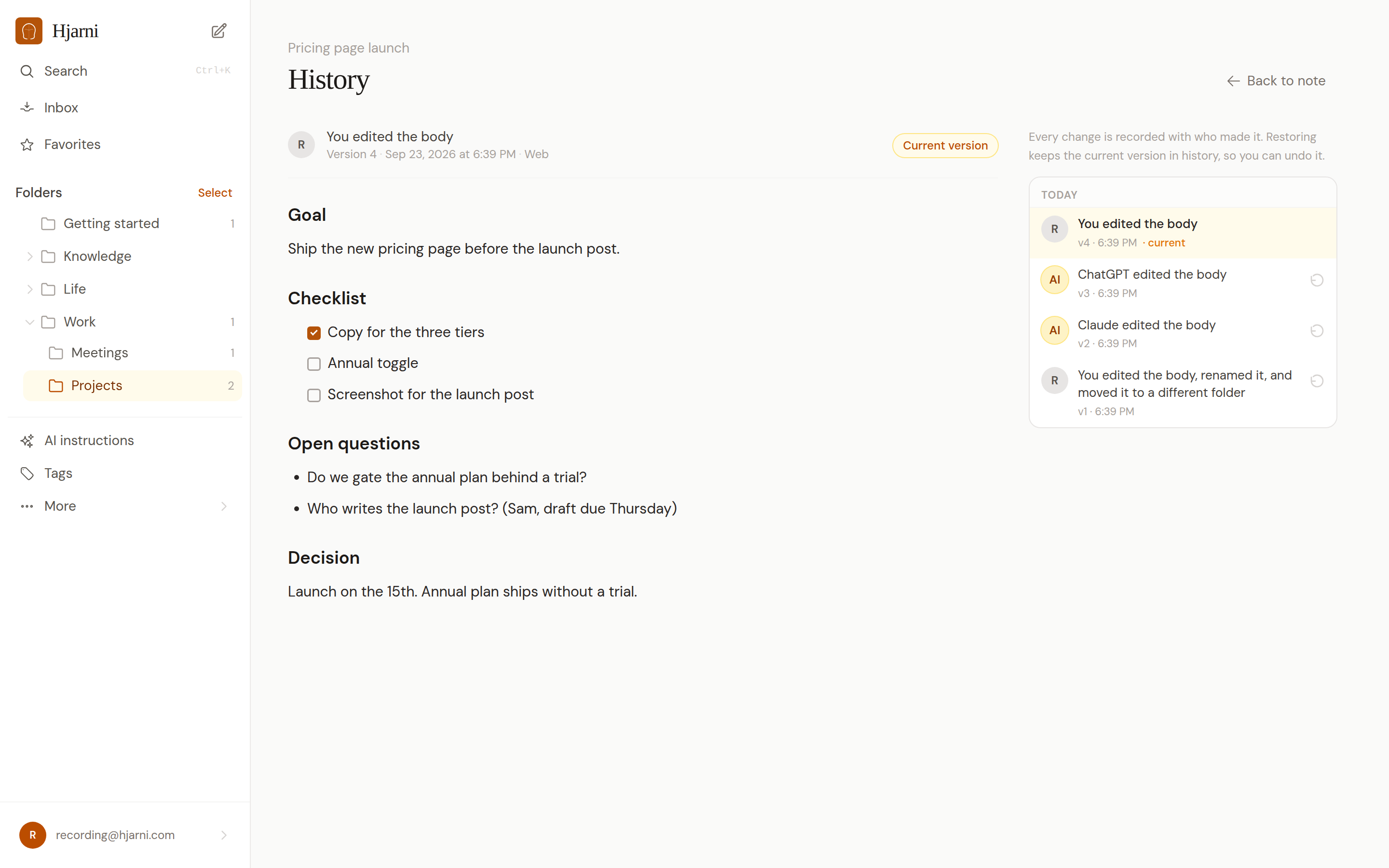
Reverting to an earlier version
Found a version you prefer? Revert to it in one click. Reverting writes a new version rather than erasing anything, so the full history stays intact and you can undo the revert like any other change.
If someone (or an assistant) saved the note after you opened the history, the revert is rejected rather than silently overwriting their work. Re-read the note and try again. This is the same conflict guard the API and MCP tools use on any write.
Deleting is recoverable: Trash
Deleting a note moves it to Trash instead of erasing it. A trashed note keeps its id, its links, its attachments, and its complete history, so restoring it is lossless and inbound [[wiki-links]] survive. Trashed notes are hidden from search and from every normal list.
Notes stay in Trash for 30 days, then are permanently purged. Restore one from the Trash screen any time before then to bring it back exactly where it was.
Where trashed notes live
Trash is scoped the same way notes are, not one shared bin:
- Your personal Trash holds the personal notes you delete.
- Each team has its own separate Trash for that team's notes, visible to the team's members.
Deleting a team note never touches your personal Trash, and deleting a personal note never appears in a team's Trash. The 30-day retention and permanent purge apply everywhere.
Across every surface
History, revert, and Trash are available everywhere you reach your notes, not just the web app:
web- A history screen with a Restore button on each version, and a Trash screen with Restore and Delete permanently.
apiGET /notes/:id/history,POST /notes/:id/revert,GET /notes/trash, andPOST /notes/:id/restore. See the REST API reference.mcp- The
notes-history,notes-revert, andnotes-restoretools, plusnotes-listwithscope: "trashed". Any note an assistant reads reports who last wrote it.
Limitations
- History lives as long as the note. Versions are kept for the life of the note and are removed only when the note itself is permanently purged from Trash. There is no separate history-retention limit.
- Provenance is not a correctness guarantee. History tells you who made an edit and lets you undo it. It does not verify that an assistant wrote the right thing. It is a record and an undo button.
- Rapid same-author edits are coalesced. A burst of small changes by one author within a couple of minutes is stored as a single version, by design. History is edit-level, not keystroke-level.
Related
Notes in Markdown
The storage model: body, summary, source URL, tags, links, files, and version history.
Privacy, permissions, and AI boundaries
What Hjarni does, what ChatGPT or Claude does, and what a connection grants.
REST API reference
Authentication, endpoints, and the history, revert, and Trash request shapes.
Give your AI a memory. Free.
Connect Claude or ChatGPT to notes they can actually read and write.
Give your AI a memory. Free.