File attachments
A note is more than text. Attach the screenshot, the PDF, or the spreadsheet right next to the note that explains it. The context and the source stay together.
How to attach a file
- Open the note you want and click Edit.
- Scroll to the Files section and click Add file.
- Choose the file from your device, and add an optional description.
- Save the note. The file is attached and downloadable from the note.
Free accounts can attach up to five files using 20 MB total in personal notes. Removing an attachment frees room immediately.
What you can attach
Images, PDFs, spreadsheets, audio, archives, code. There is no format restriction.
Free includes 20 MB total across five personal files. Paid plans allow files up to 25 MB each for ongoing attachment use.
Each file takes an optional one-line description, so you and your AI know what it is at a glance.
Where attachments show up
Images appear in a carousel. Every file is listed and downloadable in the attachments section.
Attached files come down in the ZIP alongside the notes they belong to.
Files on a note inside a publicly shared folder are downloadable from the public page.
The REST API and your AI assistant can both attach files and fetch download links.
Attachments and your AI
Claude or ChatGPT can list the files on a note and request download links. To attach a PDF, screenshot or spreadsheet from your device while chatting, ask for a link to upload it directly to the right note.
- Ask your assistant:
Give me an upload link to attach a PDF to my Website launch planning note.Use the title of the note you want. - Open the returned link, choose the file from your device, and upload it.
- Tell the assistant the upload is finished and ask it to confirm that the file is attached to the note.
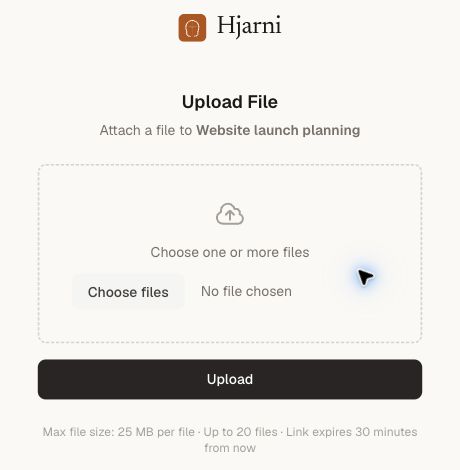

meeting-agenda.txt (176 B), described as “Sample agenda for the website launch meeting.” View full size.Upload links expire after 30 minutes; ask for a new one if needed. To save a file ChatGPT generated, download it to your device and use the upload link.
What the AI does with a file once it has the link depends on the client. Hjarni hands over the file and its description. Reading the contents is up to the model you use.
Plan
The Free plan includes 20 MB across five attachments in personal notes. You can open, download, and remove them at any time; removing one frees its storage immediately. When either limit is reached, upgrade to keep adding files. Team and shared-note attachments require a paid plan.
Common questions
FAQ
What file types can I attach?
Any type. Images, PDFs, spreadsheets, audio, archives, code files. There is no format restriction. Paid plans allow up to 25 MB per file; Free attachments share a 20 MB allowance.
What plan is required?
Free includes 20 MB across five attachments in personal notes. More capacity and attachments in team or shared notes require a paid plan.
Can my AI attach and read files?
Yes. Through MCP, Claude or ChatGPT can attach a file, attach one from a URL, list a note's files, and fetch a download link. What it does with the file depends on the client's own abilities.
Do attachments come with exports?
Yes. When you export your notes, attached files are included in the ZIP alongside the notes they belong to. See export and data ownership.
Are attachments included in a public folder?
Yes. Files attached to a note inside a publicly shared folder are downloadable from the public page.
Related docs
Questions about attachments?
Email evert@hjarni.com
Give your AI a memory. Free.
Connect Claude or ChatGPT to notes they can actually read and write.
Give your AI a memory. Free.