The web app
Hjarni on hjarni.com, in any modern browser. Everything is one click from the sidebar, and Search is one key away. This page is the map; each part links to its own guide.
The sidebar
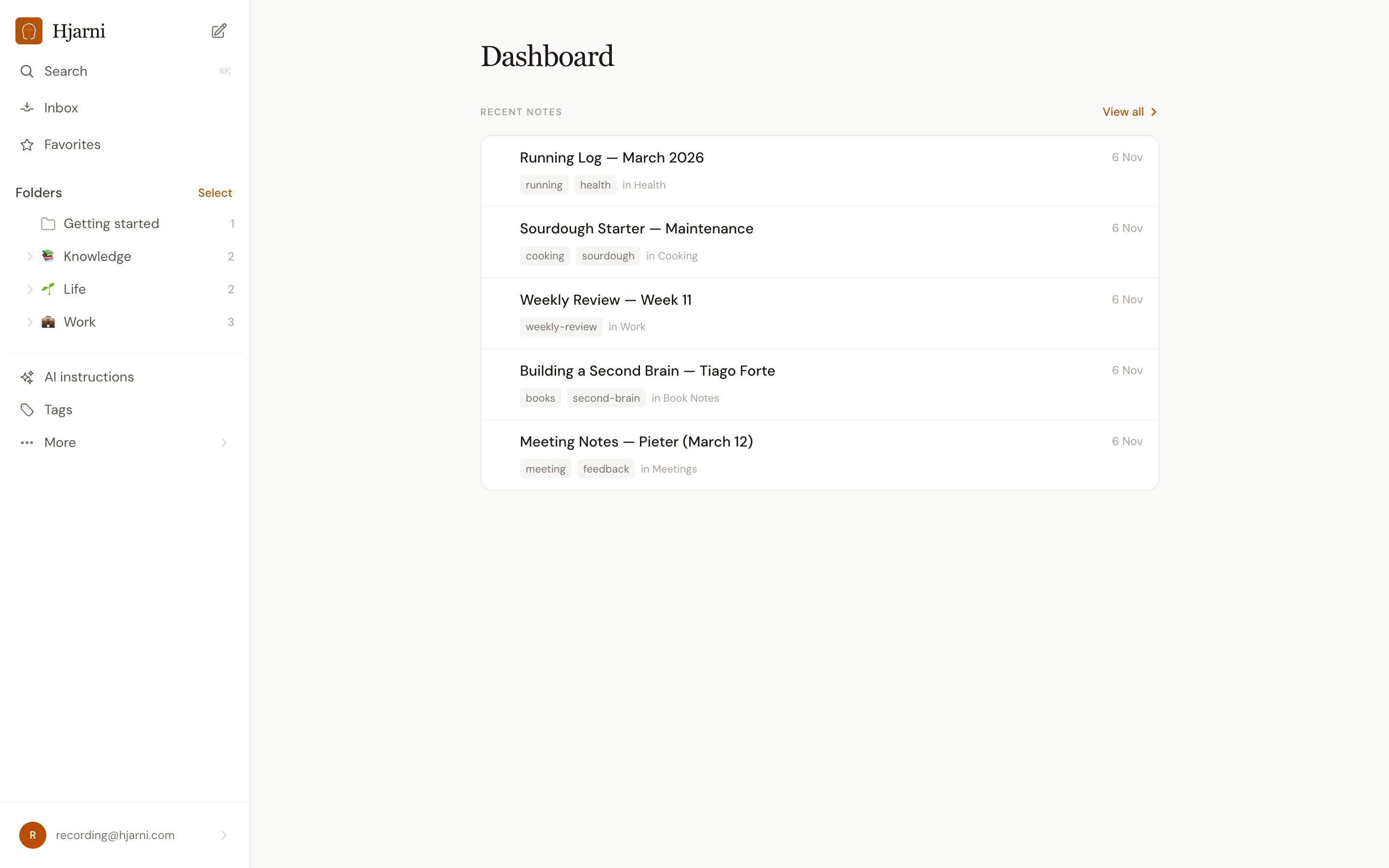
The logo takes you to the Dashboard; the pencil starts a new note. Then Search, the Inbox with the number of notes not in a folder yet, and Favorites, the notes you starred.
Your folders as a tree. In a team, your own are under Personal and each team has its own section; folders others share with you are under Shared with me. Drag a folder to reorder it among its neighbours. See Containers and tags.
AI instructions (how your AI should work with your notes; see Custom AI instructions) and Tags. More opens the Graph of linked notes, the Archive and the Trash, which keeps deleted notes for 30 days.
Your plan, and your name: click it for Settings, the docs, What's new, Help & feedback and Sign out.
Sections stay open or closed the way you left them. Too narrow or too wide? Settings › General › Appearance sets the sidebar width for this browser.
Dashboard
Where you land after signing in. Recent notes lists what you or your AI changed last, with your Favorites above it once you star a note. While you set up, a card at the top walks you through connecting your AI; after that it shows at most one suggestion at a time, which you can dismiss.
New here? Getting started takes you from the first note to your AI reading it.
Search
Press ⌘K on a Mac or Ctrl+K on Windows from any page, or click Search in the sidebar. Results update as you type. Hjarni looks in titles, summaries, the text of your notes, tags and folder names.
- In a team, narrow the results to Personal or one team.
- The most recently changed notes come first; sort by Oldest or Title instead.
- An empty search lists every note, which makes it the place to sort through everything at once.
- The text inside attached files is not searched, but your AI can read those files when it opens the note.
Several notes at once
Note lists, in the Dashboard, the Inbox, Favorites and Search, have a box in front of each note. Tick a few and a bar appears with Move to…, Archive and Delete. It is the quickest way to empty the Inbox: search, tick, move.
For folders, click Select next to Folders in the sidebar. Deleted notes and folders wait in the Trash for 30 days; see Note history and Trash.
Settings
Your name, your teams, Appearance, Sign out and Delete account.
Your plan, and where to change or cancel it.
How to connect an assistant, the AI assistants connected now (disconnect any of them), and agent and API tokens.
Keyboard shortcuts
| Mac | Windows | What it does |
|---|---|---|
| ⌘K | Ctrl+K | Search, from any page. While you write a note it inserts a link instead. |
| ⌘S | Ctrl+S | Save the note you are editing. |
| Esc | Esc | Close a menu; leave a note you opened for editing but did not change. |
Click anywhere in a note's text to start editing at that spot. Formatting, headings, lists and links have their own keys while you write; they are all in The note editor.
Browsers and phones
Hjarni runs in current versions of Chrome, Safari, Firefox and Edge: Safari 16.4, Chrome 111 and Firefox 113 or later. An older browser gets a page asking you to update. On a phone's browser the sidebar folds into a menu behind ☰, and Hjarni suggests the free app, which also has the share sheet and a New note widget.
The web app is in English and has a light theme. To save pages from Chrome in one click, add the Web Clipper.
Common questions
FAQ
Is there a keyboard shortcut for search?
Yes: Cmd-K on a Mac, Ctrl+K on Windows, from any page. While you are writing a note, the same keys insert a link instead.
Can I make the sidebar wider?
Yes. Settings, then General, then Appearance: pick a sidebar width from Compact to Extra wide. It is saved for that browser.
Does Hjarni have a dark mode?
Not yet. The web app and the apps have a light theme only.
How do I move many notes out of the Inbox at once?
Open the Inbox or Search, tick the notes, and choose Move to… in the bar that appears. Archive and Delete are there too.
Which browsers does Hjarni support?
Current Chrome, Edge, Safari and Firefox: Safari 16.4, Chrome 111 and Firefox 113 or later. An older browser is asked to update.
Related docs
Can't find something?
Email evert@hjarni.com
Give your AI a memory. Free.
Connect Claude or ChatGPT to notes they can actually read and write.
Give your AI a memory. Free.